



 ELAM, a Canadian corporate language training provider, is launching ELAM Coach, an AI-powered tool that helps learners practice between live virtual classes.
ELAM learners can use the coach to review material from class, ask language questions, practice ELAM Learner Profiles, workplace conversations and build speaking confidence outside their scheduled sessions. ELAM delivers its live virtual classes through Microsoft Teams, with trainers who adapt lessons to each learner’s level, role and communication goals.
What is ELAM Coach?
ELAM Coach is ELAM’s branded AI language coach. It is powered by Language Coach AI through a white-label partnership.
The tool gives learners access to additional language practice between classes. Depending on the program and features enabled, learners may use ELAM Coach to:
- Practice conversations in French, English, Spanish, German, Portuguese from Portugal, Portuguese from Brazil, Italian, Dutch.
- Review vocabulary from a recent lesson based on ELAM’s Learner Profiles
- Rehearse a meeting or presentation
- Role-play a customer conversation
- Ask grammar and word-choice questions
- Practice pronunciation
- Receive feedback while practicing
- Repeat an activity until they feel ready to use the language at work
ELAM Coach brings these capabilities into ELAM’s existing trainer-led programs.
Practice what you learn with your ELAM trainer
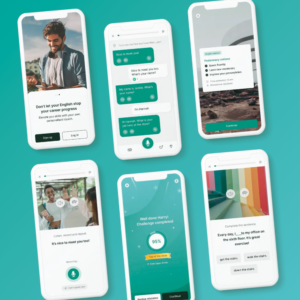 Learners often understand a new expression during class but need more time to use it naturally. ELAM Coach gives them another opportunity to practice while the lesson is still fresh.
A learner can use ELAM Coach after a class to:
- Repeat new vocabulary in different sentences
- Practise a conversation from the lesson
- Ask why one phrase sounds more natural than another
- Prepare for a workplace interaction
- Review a grammar point before the next class
- Practise speaking without waiting for the next session
The live trainer remains central to the learning process. The trainer explains the language, answers complex questions, corrects errors, adds cultural context and connects the lesson to the learner’s work. ELAM Coach gives learners more time to use that language on their own.
Live instruction and AI practice work together
ELAM Coach supports a simple learning cycle:
- The learner studies a language skill based on ELAM’s Leaner Profiles with an ELAM trainer in Microsoft Teams.
- The learner uses ELAM Coach to practice the skill between classes.
- The learner brings questions and difficult situations back to the trainer.
- The trainer adjusts the next lesson based on the learner’s needs.
For example, a learner in a business French course might study how to give a project update. After class, the learner could ask ELAM Coach to simulate a meeting with a French-speaking manager.
The learner could practice:
- Explaining a project delay
- Giving a progress update
- Answering follow-up questions
- Asking for clarification
- Discussing a revised deadline
- A learner studying business English could rehearse a client call, practice a presentation introduction or work on diplomatic ways to disagree in a meeting.
Workplace language practice on demand
ELAM’s corporate programs focus on communication that employees use in real work situations. These situations may include meetings, presentations, customer service, professional writing and industry-specific terminology.
ELAM Coach can give learners a place to practice those situations outside class.
 Possible activities include:
- Introducing yourself to a new colleague
- Explaining a technical problem
- Responding to a customer complaint
- Presenting data to a team
- Asking a manager for support
- Negotiating a deadline
- Participating in a video meeting
- Preparing for a job interview
- Making small talk with a client
- Explaining a process to a new employee
The learner can repeat the conversation, change the difficulty or ask for a different version of the scenario.
Ask language questions when they arise
Learners do not always have questions during a scheduled class. They may notice a problem later while writing an email or preparing for a meeting.
ELAM Coach can help them work through questions such as:
- Is this phrase appropriate for a client?
- Can you make this sentence more formal?
- What is the difference between these two words?
- How would a native speaker say this?
- Can you correct this email?
- Can we practice this conversation more slowly?
- Can you ask me questions about this topic?
- Can you explain this grammar rule with examples?
- The learner can then discuss important questions with an ELAM trainer during the next live class.
<< AI can create more opportunities for speaking practice. >>
Speaking improves through use. Learners need repeated opportunities to listen, respond, make mistakes and try again.
A 2024 systematic review examined 24 studies published between 2017 and 2023 on AI chatbots and English speaking practice. The review found potential benefits related to oral practice, interaction, vocabulary retention and learner comfort. It also noted that AI tools work best when they support a well-designed learning program.
AI practice does not replace the need for a qualified trainer. A trainer can judge whether a phrase fits a particular workplace, explain cultural differences, identify recurring problems and adapt activities to the learner’s goals.
Built for corporate language training
 ELAM has provided corporate language training since 1993. Its signature programs serve professionals and organizations in Canada and internationally.
ELAM offers training in 12 languages, including English, French, Spanish, Italian, Portuguese, German, Dutch, Polish, Russian, Japanese, Mandarin and Cantonese. Programs range from complete beginner level through advanced levels on the Common European Framework of Reference for Languages.
ELAM also offers industry-focused training for sectors such as healthcare, finance, aerospace, manufacturing, food services and customer-facing roles.
ELAM Coach adds independent practice to this training model. Learners can work on the language they need for their job instead of completing unrelated exercises.
Who can use ELAM Coach?
ELAM Coach is intended for learners enrolled in ELAM language programs. It may be useful for:
- Employees learning French, English, Spanish, German, Portuguese from Portugal, Portuguese from Brazil, Italian, Dutch for work.
- Professionals preparing for meetings or presentations.
- Employees who want more speaking practice.
- Learners with limited time for independent study.
- Teams working across English-speaking and French-speaking regions.
- Newcomers developing workplace communication skills.
- Employees preparing for job-specific assessments.
- Organizations adding digital practice to live language training
ELAM offers one-on-one, semi-private and small-group training. Its corporate signature programs cover learners from A0 to C1, depending on the program.
ELAM Coach supports trainers. It does not replace them.
ELAM Coach gives learners additional opportunities to practise. ELAM trainers provide the instruction, context and personal feedback needed to improve.
A trainer can:
- Monitor their student’s online practice via the ELAM Coach portal
- Identify a learner’s recurring errors
- Explain cultural and professional differences
- Adjust the lesson to a specific job
- Select useful workplace vocabulary
- Help a learner communicate more naturally
- Provide feedback that considers the learner’s full progress
ELAM Coach can then give the learner more time to apply that feedback and reinforce the process of learning new language!

1. What is ELAM Coach?
ELAM Coach is ELAM’s branded AI language coach, available on Google Play and the Apple App Store. It helps learners practice speaking, build vocabulary, improve pronunciation, and develop workplace communication skills between live virtual classes.
2. Does ELAM Coach replace language trainers?
No. ELAM Coach provides additional practice between classes. ELAM trainers continue to lead the live lessons, guide the learning plan and provide expert feedback.
3. How does ELAM Coach work with Microsoft Teams classes?
Learners attend live virtual classes with ELAM trainers through Microsoft Teams. They can use ELAM Coach between sessions to practise material connected to their course. The exact workflow may vary by program.
4. Can learners practice speaking with ELAM Coach?
ELAM Coach is designed to support conversational practice and role-play. ELAM should confirm the exact voice, pronunciation, transcript and feedback features available at launch.
5. Can ELAM Coach support business language learning?
Yes. The tool is intended to support professional communication, including meetings, presentations, client conversations and workplace vocabulary. The activities available may depend on the learner’s course.
6. Is ELAM Coach available to every ELAM learner?
In the fall 2026, we are soft launching the app to 300 selected ELAM language learners and will depend on the learner’s program, language, level and enrollment terms. Contact ELAM for current availability.
7. Which languages does ELAM Coach support?
ELAM offers corporate training in 12 languages and ELAM Coach will be available for: English, French, Spanish, German, Italian, Portuguese.
8. How often should learners use ELAM Coach?
Learners should follow the practice recommendations provided by ELAM and their trainer. Short, regular sessions may be easier to maintain than occasional long sessions.
Learn with ELAM and ELAM Coach
Contact ELAM to ask about corporate language training that combines live instruction through Microsoft Teams with AI-supported practice between classes.
Give your team more opportunities to practice. Contact ELAM to learn about ELAM Coach.